These are the daily project that I drew one poster everyday. I started from December 2016 and end in May 2017. Within 6 months, my drawing technique does not have a big improvement or any obvious differences.
I made a storyboard to pre-visualizing the making of video. It also helps me and my team member know which footage to use.
Final Making of Video
Improvement and self-evaluation
Here is our final making of video. I spent a lot of time on this making of video and I felt satisfy with quality and background music.
However, if I have more time to do it, I would like to do few more experiments and make the pixilation video content more interesting. As you see the final project we filmed here was too short and lack of attractive. I would like to film the actor lay on the ground and use some props to manipulate the scene.
The group making of has enhanced my storytelling skills and documentary techniques as my main job was documenting the behind scenes. It also enhanced my problem solving skills as lack of facilities, we had to compromise to the circumstances, which film in the stop motion room in order to make a good production with better quality.
After experiencing the group making of , I realized there are so many skills I should learn such as acting. When I acted in the scene, my movement was stiff and unnatural. I am less capable in the acting whereas Daniel did a good job. In the future, I will read more books that relates to acting and try my best to enhance my performance skills.
To finish off the pixilation video, I have to choose the appropriate song as the background music. I was think to pick something peaceful and relaxing genres as they are my usual style, I used these kinds of genre in the past making of. However, it does not fit in group making of, because the majority of our videos are rapids and fast motion, it would be much better with rap or Hip-pop music.
Finally we come to the stage of post-production. Today, Our task is to edit the video together and Daniel was going to record the voice over. As we render the video, we noticed that there are 11 photos missing without reasons. This has caused a serious issue to us as the video can not complete. However, we still going to use them by cut out the missing part and put into separate video footage.
The problem We had from the last experiment is that the camera was not good enough, the position has been moved and the photos are caper too. Therefore, we decided to move into stop motion room because there is stop motion programme and we can use lighting and onion skin to improve the frames. Here is a video https://vimeo.com/8734025 that inspired me to do something extremely simple but interesting.
Today, We plan to do some little stories about eating and drinking coffee here. The position was fine, but we met a new problem, which is my facial expression could not match because I kept laughing during the film. Today's actor experience made me realise that be an actor is not as easy as it looks. However, Daniel did a very good job as he stayed calm and steady during the whole filming process and acted very well. I am glad that each member in my group has different skills and did a great corporation. For instance, Daniel's always eager to act and Jungtong prefers to be a man behind the scene, operate the camera and editing. Our final pixilation video might not be great but I have been enjoying the filming process a lot, the experience also enhanced my leader skills and a better understanding of working in part of a group.
On Monday, We started filming pixilation movie- Daily Life. I and Daniel brought some props and Jung brought a decent camera from a friend. Everything was ready to go!
As the previous planning, Dannie was the actor, Jung was responsible for filming and I was the director that obligated to conduct the scene and problem-solving.
Everything went well except the camera. Because of Jung's camera was too old, it paused for ages every ten minutes. What's more, the SD card also did not own enough storage for us to store the photos. Therefore, We had to constantly clean the SD card to ensure we have enough storage. This had resulted in a bad aftereffect that the post-production footage was wobbled, because of camera moved during the filming and actor did not stand in the accurate spot. The final movie looked deficient. I was dissatisfied with this consequence.
We spent the whole day on filming, but obviously, the result was dissatisfied. From this experiment, we learned the following lessons:
We need a professional camera and a good SD card, ensure it won't be an encumbrance
We need to install the onion skin. It is a very useful feature that let us see a ghostly image of previous captured frame over the live video stream from the camera. It will help us to see exactly where the actor was standing previously at any time.
Last but not least, we have to think some interesting content. As Kristin advised, the purpose of the pixilation video is a surreal look at our real world. The laws of physics and the real world no longer apply since we're using animation, but since our environment and characters are real places it puts a unique twist on filmmaking.
Next time, I will consider setting the scene in Stop motion room; there has full equipment.
Stop Motion Experiment
We did another experiment that related to the food. This idea is inspired by Jan Svankmajer. We transferred the skills from Animation 102 - the armature exercise to this making of module. The skills- timing and spacing has incorporated in here very well.
I have done a vine mageic video about mouse changing. This is to experiment with how to make a vine magic video. It was not that easy as I thought, because of the moving position, audiences can easily spot the differences.
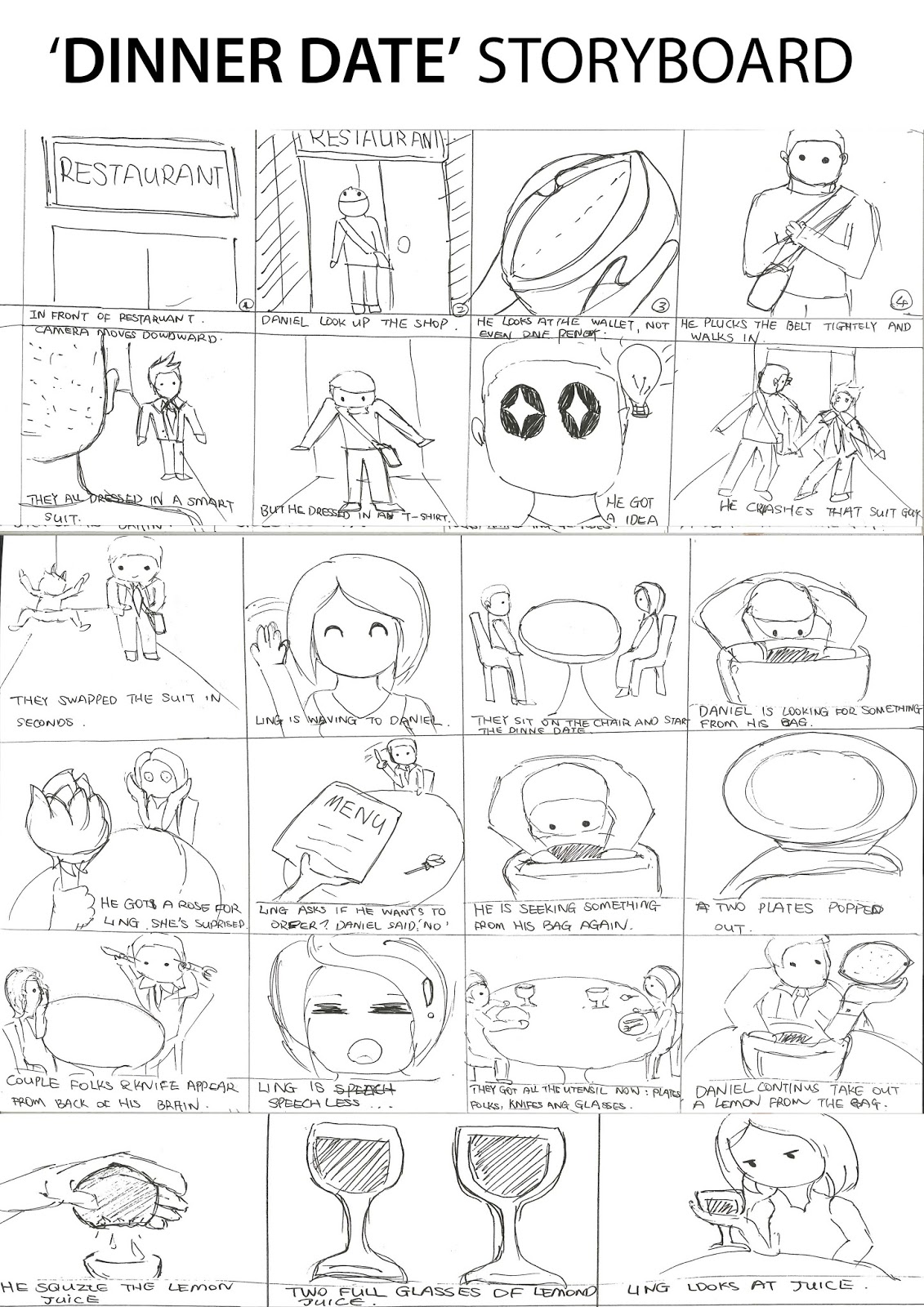
We come up with two ideas. First one is Dinner Date. A boy will date the girl in the restaurant but he has no money. However, he got a magic bag and anything can be taken from there. The story will depict how is boy going to avoid of spending money by appearing the stuff from his magic bag.
With this idea, there are some pros and cons: Pros
simple location, only need a table
interesting story line
Cons
too many shots such as close up, wild shot, over the shoulder...
need more than one camera to film
need lots of props such as rose, folks, plates...
Here is the storyboard of the Dinner Date, I have not finished it yet.
My second story is Daily Life. It will only be one shot of person stand in front of the wall, pretending he is walking. We will depict person from get up in the morning, change the pyjamas, have breakfast, travel to the uni, greeting to the peers and so on.
Pros
only need one camera
simple and easy location set
we do not have to walk round
Cons
need a lot of props
hard to set the props in the air
boring story
After I have discussed with Juntong and Daniel, we analysis the advantages and disadvantages of two ideas, We initially agreed to use second idea 'Daily Life'.
This is a very interesting animated stop motion video. The director depicts a woman's daily life on the bed through one camera angle. I like how the things move through the room, it seems very smooth and fluently. However, I won't do this kind film because there are too many props and this is a big project.
I like this game idea, the boy was playing video games but been dragging into the TV by an unknown tentacle. Then become a game character and fight on his own. It could be an interesting point to start with, but it would be difficult for us to find a wide ground and we could not set the camera above the scene.
This is an interview video of Vine star Zach King's magic video. Zach King is an American Vine star, a filmmaker and YouTube personality based in Los Angeles. He is most known for his video digital sleight of hand.
I have some ideas that inspired from his video. we can do T-Shirt changing when crashing on others. It seems easy as long as we catch the precise moment and edit together. We can also film the several scenes such as:
throw the apple up and drop the melon down
T-Shirt changing when crashing on others
get in the room without open the door
We will do the experiments over the Ester holiday to see how it works.
Schedule
I have made a schedule for the team to ensure everyone's clear about what they have to achieve every week. This diagram has clearly explained the every week's task and hopefully, we will get the project done as we planned here.
Me and Alice edited all the footage together today. We had putted all the images and video clips in sequences first, then applied video transition effects between two clips, make the video runs smoothly and naturally.
Video editing took less time than we thought. Then we turned on the background music, Alice downloaded the theme song of Corpse Bride and intended to use it as background music. She will also record the voice over, explain the process of this project. I had written the script to her so she could voice over my part as well.
Here is is the link to mine and Alice's Making of video
I am really satisfied with our final making of video, especially love Alice's voice over, as it explained our process clearly and successfully. Nonetheless, there are two elements I think we could improve if we have more time. Firstly, the video is too short that does not meet the requirement 3-5 minutes. The beginning where the moodpboard and idea maps were too quick for audiences to read. We should have make it a bit slower. Secondly, the video of the graveyard was shaking too much, make viewers feel dizzy. It wasn't easy to shot the graveyard with hand hold camera, that's why it shakes so much. However, we will make it better next time.
Here is the final composite of the project. We intended to put the puppet in front of green screen, so we can composite in the after effect a bit easier. However, we did not find any green background, so we only used the photography that we already took in the stop motion room, it still works very well. I cleaned up the extra background around the puppet and imported into the background. In addition, I also used the tint and colour correction to adjust the tone of the puppet so it looks match to the background.
Alice had completed the basic puppet in last few weeks and it looks fantastic. I love the shape of the body, she's very skinny but characteristically. We decided to paint together, to make the puppet more real.
I really like her hair as the red colour made her more recognizable. We got this idea from a television program character (I don't know the name of her), it inspired us of creating a strongly feature of a character, so audiences can remember it easily.
We intended to paint her dress in brown but it did not work well, because she looked bloody and violent, which is not what we aimed for. Therefore, we painted blue over the brown and it looked slightly better. Although we are not satisfy with the dress, but we got some experience of puppet making and basic colour theory.
Today, I have finished the all the background effect and exported them into a video. During the process of adding effect, I met several technical problems and it had stressed me out. For instance, I could not move the CC light ray follow along the moon, I attempted to make the moon bright and shinny so it would make the whole background looks fantasy and mysterious, but I failed on the area of move the light ray.
Another problem that annoyed me was that the final video looks desultory, especially when the moon's rising up the sky and rotating itself, it seems like paused video that makes intermittent video quality.
Then, I tried to export the video in format of mp4. and this time the video plays very smoothly, but the video colours looks slight darker and duller.
After I did the collaboration of environments photos, I montages the castle behind the grave scene and used the filter to change the photograph into painting-look.
As Alice suggested to make the painting panel shot, I am going to add more things to it such as forest, old town and so on.
In addition to work on Photoshop painting, I also looked at some after effect tutorials because we are going to animate the background such as rotate the moon, trees wiggling, fog appears... to make the scene interesting.
I tried to corporate the new techniques I learned from YouTube, but it did not work very well in our background, so I just decided to do simple rotation of moon with the previous acknowledges. It seems worked pretty well.
Alice and I talked about environment design of this project, and we think we could do the sets digitally with Photoshop and After Effect. There are some places where is suitable for theme:
Today, We screened the video and got some lovely feedback from people.
Feelings
I think I did a good job about the primary research and digital painting. However, I don't like the voice over as it has lots of background noise during the taking.
Evaluation
I think the video is good to contextualize and show some research, as well as the sound track.
The only off putting thing was the noise behind the voice when I spoke.
Feedback
Analysis
I should have solve this problem when make final video. Recall to last week, I still have couple days off to make video even better. I could ask James to help me with the technique problem as well.
Conclusion
I could also re-record the audio. As I still had time to improve it.
Action Plan
If this problem happen again, I would try my best to get rid of the noise by watching online tutorial or ask professional person.